
Electronic Checklist Management Tool (ECMT) post v5.9
Effectivity: Global 5000 GVFD/5500/6000/6500 aircraft
ATA: 31-40
By: Stephan Bidnyk – Avionics, Technical Services This update is intended to inform operators who are currently customizing their Electronic Checklist (ECL) with the Rockwell Collins Checklist Tool (RCCT), and customers who currently create customized checklists using the Collins Aerospace Electronic Checklist Customization Tool (ECMT).
Following the update for Bombardier Global aircraft to avionics software v5.9, the ECL software is upgraded to a new version that carries a different format for the loadable checklists. Any current checklist databases with the old format (RCCT and ECMT pre v5.9 ECLs) will not work with the new aircraft software.
To support the new format in parallel with the previous version, a new "Program" will be created within the CASE/ECMT tool. This appears as a new, nested entry in the prompt shown after opening the tool, as shown in the snapshot below:
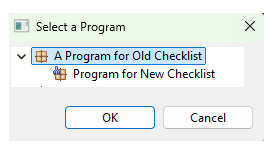
This new entry will target the new checklist format. Please take care to choose the correct entry ensuring compatibility with the desired target aircraft software version.
Due to format incompatibility, checklists for the new aircraft software version are intentionally prevented from being imported into a tool program that targets the old checklist format.
When obtaining checklists from the MyBombardier web portal, please be aware of which aircraft software version those checklists were built for.
However, checklists from the old aircraft software version can be imported into a tool program which targets the new checklist format, with the appropriate updates.
For example, correcting the indentation and spacing, since these configurations may differ between the old and the new, leading to checklist lines that spill over into multiple lines where they previously only occupied one.
The new checklist format may have differing constraints on the checklist contents, such as fewer lines shown per page, fewer characters available in a line, etc. Please check for these changes early and plan your updates accordingly. Previous custom checklists may need to be reworked to fit within the new constraints for the new checklist format.
The new checklist format does not carry an embedded Checklist Input DataBase (CIDB - list of CAS Messages and Sensed Items). After importing checklists in the new format, you may notice a list of Errors displayed against some Non Normal or Emergency checklists. These errors appear like "CAS Message 'xyz' does not match anything from Aircraft Data". These errors are resolved by configuring the desired CIDB version that matches the target aircraft software version.
To configure the desired CIDB, go to the File menu and select "Modify CIDB Applicability" to open the wizard. Then toggle the desired version as "Applicable" and click Next through the wizard. If the CIDB version to select is unclear, please contact Collins’ CASE/ECMT support team at case-acct-mgmt@collins.com.
Collins is in the process of creating these new Program entries in CASE/ECMT for each customer. It may not be available right away. If you have a planned date for upgrading your aircraft to the latest aircraft software version, and thus need the capability to generate new checklists by that date, please contact Collins’ CASE/ECMT support team at case-acct-mgmt@collins.com.